Managing employee work information across disconnected systems creates payroll errors, compliance gaps, and onboarding delays. Onfinity ERP centralizes work data, automates component assignment, and ensures accurate records from hire to exit.

Managing employee work information across disconnected systems creates payroll errors, compliance gaps, and onboarding delays. Onfinity ERP centralizes work data, automates component assignment, and ensures accurate records from hire to exit.

Managing recurring deliveries to enterprise clients without recreating orders each month is essential for pricing consistency and operational efficiency. Onfinity ERP enables businesses to define long-term sales agreements once and release orders on schedule while maintaining full visibility from agreement to invoice.
Coordinating interviews across departments often leads to fragmented processes and inconsistent candidate evaluation. Discover how interview panel configuration in Onfinity ERP brings structure, accountability, and workflow automation to enterprise recruitment.
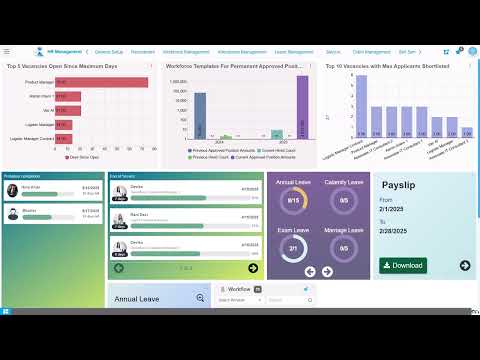
When salary increments apply to past months, organizations face complex back pay calculations across closed payroll periods. Learn how automated retro payroll processing in Onfinity ERP calculates variances, verifies adjustments, and integrates retroactive amounts into regular payroll runs without manual reconciliation.
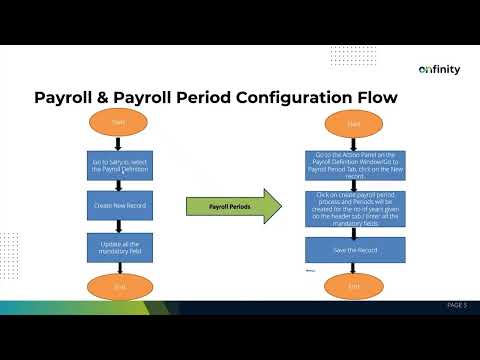
Payroll periods must exist before employees can be assigned to salary structures. Learn how to configure payroll definitions and automate period creation in Onfinity ERP to eliminate manual entry and prevent assignment errors.

Most ERP systems force teams to work within rigid screen layouts that don’t match real-world workflows. Onfinity ERP lets you design custom pages, dialogs, and button-triggered workflows that adapt to how your business actually operates—without breaking core functionality or waiting on vendor support.
Most ERPs focus on tracking inventory for sales and production, but internal consumption like spare parts, fuel, or project materials often falls through the cracks. Learn how Onfinity structures internal inventory usage into a complete workflow that reduces stock discrepancies and supports accurate ledger posting.
Learn how to configure standard operations and work center tasks in your manufacturing ERP to organize production workflows, connect resources accurately, and align task execution with your planning cycles.
Payroll errors often trace back to poorly configured component definitions. Learn how proper setup of earnings, deductions, and leave types in Onfinity ERP ensures accurate processing and eliminates manual calculation adjustments.
Finance teams often juggle manual adjustments, accruals, and period-end corrections across disconnected forms. A unified GL journal interface reduces errors, speeds up posting, and keeps the full lifecycle visible in one place.
Learn how Onfinity ERP automates profit and loss closing by transferring net results to retained earnings, resetting revenue and expense accounts, and streamlining period-end processes without manual journal entries.
Manual document uploads drain productivity and create visibility gaps across finance and operations. Learn how Onfinity ERP’s Job Autorun Config eliminates repetitive tasks by automating uploads from servers and emails while scheduling indexing to keep search functionality current.
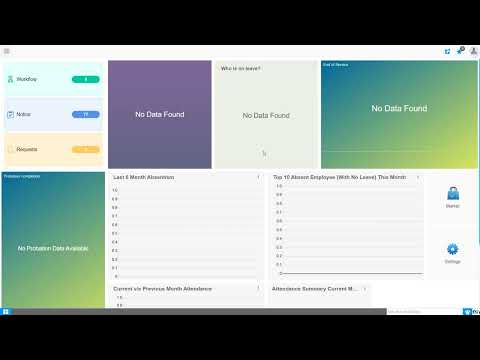
When employees take travel advances but actual expenses differ, finance teams face reconciliation gaps. Learn how integrated ERP workflows connect requisitions, claims, and payments to eliminate manual errors and speed up reimbursements.
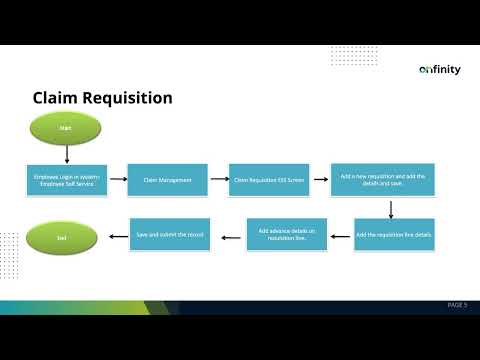
Finance teams struggle with manual travel advance requests submitted through emails and spreadsheets. Onfinity ERP’s claim requisition workflow connects employee self-service portals with finance payment processing to eliminate data re-entry and approval delays.
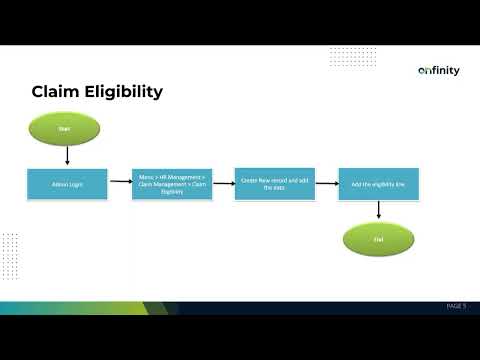
Automating claim eligibility by grade, position, or job eliminates manual verification and ensures consistent reimbursement limits across employee levels. Onfinity ERP centralizes eligibility rules for travel, accommodation, and transport claims in a single configuration module.

Moving funds between company-owned bank accounts shouldn’t require multiple screens or manual conversions. Onfinity ERP centralizes internal bank transfers through a single payment form, automating AP and AR document creation while supporting multi-currency transactions with real-time conversion.
Learn how finance teams configure opening balances during ERP go-live using temporary clearing accounts, phased imports, and structured validation to prevent double-posting and ensure accurate trial balance migration.

Timesheet configuration in ERP systems connects attendance tracking directly to payroll cycles. Learn how Onfinity enables HR teams to define monthly, bimonthly, or weekly periods that align with organizational pay schedules and reduce manual reconciliation.
Finance teams comparing ERP platforms typically miss 40–60% of real costs. This breakdown shows where SAP and open-source alternatives diverge financially—from licensing escalation to implementation timelines to the recurring operational overhead that compounds over five years.
Learn how modern ERP systems automate asset depreciation calculations, accounting entries, and register updates to reduce errors and eliminate spreadsheet reconciliation for finance teams.