
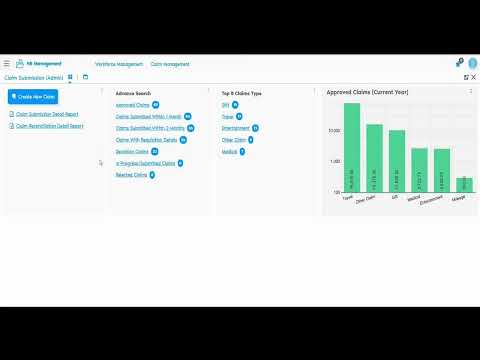
Why Expense Claim Workflows Need More Than Spreadsheets
Finance teams tracking employee expenses face a recurring challenge: requisitions, submissions, approvals, and payments live in disconnected tools. Employees submit claims through email or shared drives, admins try to match approvals with budgets, and finance teams reconcile payments manually at month-end.
An expense claim management system brings these workflows into a single environment where requisitions, approvals, and payments connect without manual handoffs. When claim data flows directly into financial records, reconciliation becomes a query instead of a project.
Without integration, approved claims sit in one file while payment records live in another. Finance teams export, cross-reference, and correct discrepancies by hand. Employees wait days to learn if their claim was approved or if something needs correction.
Admins lack visibility into claim eligibility, duplicate submissions, or whether an employee has already exceeded their approved limit. Budget overruns appear only after payments go out, not when claims are submitted.
How Onfinity ERP Separates Requisitions from Submissions
Onfinity structures expense workflows around two distinct processes: requisition for advance requests and submission for reimbursement. This separation clarifies intent and simplifies reconciliation.
Employees use the requisition feature to request advance amounts before travel or events. They specify dates, destinations, currency, and the amount needed upfront. Once approved, finance teams can generate payments before the expense occurs.
The claim submission feature handles reimbursement of actual expenses. Employees attach invoices, enter the amounts spent, and submit for approval. If a requisition was linked, the system shows how much was advanced and how much is being claimed.
Approved requisitions can be attached to submissions during the reimbursement process. This connection makes it clear whether the employee is requesting more than the original advance or returning unused funds.
Eligibility checks prevent employees from submitting claims beyond approved limits. Admins define claim types, subclaim categories, and maximum amounts per category. When an employee tries to submit a claim that exceeds these rules, the system flags it before it reaches approval.
Both workflows support multi-currency entries and date-range tracking, which matters for international travel or cross-border operations.
Role-Based Access Across Employee, Admin, and Finance Users
Onfinity adjusts views and permissions based on user role. Employees see their own claims and requisitions. Admins see all employee submissions and can configure claim types. Finance users see approved claims ready for payment and reconciliation.
Employees access claim submission and requisition forms through self-service portals and the mobile app. They can create new claims, attach receipts, check approval status, and edit rejected submissions.
Admins define claim types, subclaim categories, and eligibility rules per organization. They can also create or edit claims on behalf of employees, filter records by status or period, and review all submissions across departments.
Finance users generate expense vouchers, enter payment details, and complete reconciliation. They see only claims that have been approved and are ready for processing. Payment status updates directly within the claim record, so there’s no need to update a separate ledger.
Mobile App Support for Remote Claim Submission
Employees traveling for work don’t always have desktop access. Onfinity’s mobile app lets them submit claims, attach receipts, and check approval status from anywhere.
Users log in via PIN and see a dashboard of all submitted claims. Each claim shows its current status: in progress, approved, rejected, or draft. Employees can filter by status and date range without switching to desktop.
Attaching receipts and invoices happens directly from the mobile device. During travel, employees can snap a photo of a receipt and attach it to the relevant subclaim category, such as accommodation or transport.
Rejected claims can be edited and resubmitted immediately from the app. The employee reimbursement software shows the rejection reason, so employees know exactly what to correct before resubmitting.
Finance Integration: From Approval to Payment
Once a claim is approved, finance users take over. They generate expense vouchers for approved submissions, enter bank details, and track payment completion within the same interface.
Finance admins can generate vouchers in bulk or for individual claims. Selecting a specific claim submission creates a voucher linked to that record. Otherwise, the system processes all approved claims at once.
Payment details are entered directly within the claim record. Finance users add bank account information, payment method, and any reference numbers. Once payment is completed, the status updates automatically.
The reconciliation report matches requisition advances with actual claim submissions and payments. It shows submission number, claim amount, advance amount, expense invoice amount, payment amount, and cash journal entries if applicable.
Multi-currency support ensures accurate reporting across international travel expense automation. When an employee submits a claim in sterling and another in rupees, the system handles both without requiring manual conversion.
Reports That Connect Requisitions, Submissions, and Payments
Onfinity provides three reporting views that connect the full lifecycle of a claim: requisition, submission, and payment.
The claim requisition report shows organization, employee name, requisition number, start and end dates, requisition name, currency, requested amount, approved amount, and subrequisition details. It also shows advance amounts for each subrequisition, so finance teams know exactly what was paid upfront.
The claim submission report tracks organization, employee name, submission number, date range, claim name, currency, total claim amount, subclaim details, expense invoice amount, payment amount, and cash journal entries. This report confirms whether submitted amounts match approved budgets.
The reconciliation report links requisition and submission data to confirm advances are settled correctly. It includes submission number, requisition number, claim amount, advance requisition amount, expense invoice amount, payment amount, and cash journal amount.
All reports include organization, employee, date range, and currency details, which makes them ready for audit without exporting data to external tools. Finance teams gain consolidated visibility into who claimed what, when it was approved, and how much was paid.
See the Workflow in Action
If your finance team reconciles expense claims across emails and spreadsheets, Onfinity connects requisitions, approvals, and payments in one system. Request a demo to explore how role-based workflows reduce handoffs and improve visibility across employees, admins, and finance users.
Follow us on our LinkedIn page for updates and insights.