
Why Performance Management Gets Fragmented in Growing Organizations
Many organizations set employee goals in one tool, track milestone progress in spreadsheets, and manage appraisals in a separate system. This creates coordination overhead and makes it difficult for reviewers to see real-time progress across departments.
When performance data lives in disconnected tools, linking goals to formal appraisal cycles becomes a manual process. Managers spend time exporting, reconciling, and transferring data instead of focusing on meaningful feedback. A performance management system in ERP addresses this by consolidating goal setting, milestone tracking, and appraisals in one platform.
Without a central view of individual, departmental, and organizational goals, it becomes harder to align team priorities or track progress against broader business objectives. Communication gaps between employees and reviewers slow down feedback loops, and milestones requiring attention can get lost in email threads or status update meetings.
How Onfinity ERP Centralizes Goal Tracking Across Levels
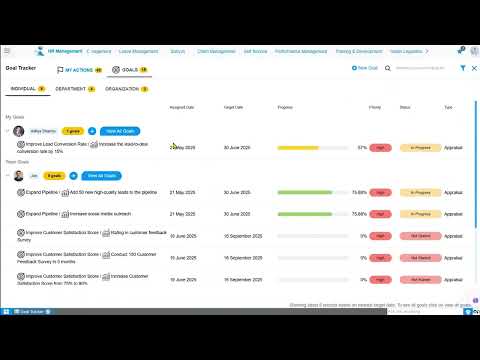
Onfinity provides a single dashboard where users can view and manage goals at three levels: individual, departmental, and organizational. Each goal is categorized by assignment type, which determines where it appears and who can see it.
When creating a goal, users set priorities, categories, and timelines. They can define whether the goal is tied to an individual, a department, or the entire organization. Key results can be added to each goal, and the system generates corresponding milestones based on tracking frequency—weekly, monthly, bimonthly, yearly, or custom.
The dashboard includes filters that let users view milestones by frequency and status. For example, selecting “view all” shows which milestones are in progress, approved, or not yet started. This visibility removes the need to chase updates or compile status reports manually.
Each goal can be broken down into key results, which support three measure types: outcome-based, qualitative, and quantitative. Outcome-based tracking compares expected values against actual values. Qualitative tracking uses percentages to represent completion. Quantitative tracking assigns numeric values based on the nature of the goal.
Real-Time Milestone Updates and Reviewer Workflows
Employees and reviewers interact within the same system to track progress and provide feedback. The “My Actions” section displays two views: one for employees (reviewees) and one for reviewers.
In the reviewee view, employees see all milestones assigned to them for the current week and the previous two weeks. They can update progress, upload documents, and submit milestones for review. If a milestone is complete, they mark the corresponding checkbox and save. Comments can be added directly to communicate with the assigned reviewer without switching to email or messaging tools.
In the reviewer view, managers see all employee milestones that require attention. They can edit each milestone, update progress, add feedback, and mark it as accepted or rejected. Once a decision is made and saved, the milestone updates its status and disappears from the pending list.
This two-way interaction reduces delays and keeps both employees and managers aligned on progress. Real-time comments and direct messaging are built into the platform, which removes the need for separate communication channels or follow-up meetings.
Linking Goals Directly to Appraisal Plans and Skills
When a goal is created, users can select the category as “appraisal.” Goals marked this way are automatically included in automated performance appraisal calculations during review cycles. This removes the need to manually transfer performance data into appraisal forms.
Managers can initiate appraisal plans directly from the goal tracker. The system includes fields for submission start and end dates, as well as the conduct date. Skills and competencies are linked to the appraisal plan, and reviewers are assigned for each area.
The appraisal form captures self-assessments and reviewer evaluations in one place. All remarks related to key results, skills, and competencies are recorded within the same template. Once the manager closes the appraisal, a final report is generated that includes all performance data tied to the employee’s goals.
This integration ensures that appraisal reports reflect actual progress tracked throughout the cycle, rather than relying on end-of-period recollections or manual summaries.
Using Templates and Custom Tracking Frequencies to Scale Performance Processes
Onfinity includes a goal library where users can save previously created goals as templates. When setting up new key results, users can apply a template to reuse goal structures, measure types, and tracking frequencies. This standardizes performance processes across departments while allowing flexibility for unique targets.
When generating milestones from key results, users can choose from three options. The “split equally” option divides the total value evenly across all milestones. The “custom values” option lets users assign specific fixed values per milestone. The “no values” option is used when the goal requires progress tracking without numeric targets.
Tracking frequency can be set based on business needs. Weekly tracking helps monitor short-term deliverables. Monthly and bimonthly options support longer-term goals. Yearly tracking is used for strategic objectives. Custom ranges allow users to define specific time frames that align with project cycles or fiscal periods.
These options reduce setup time for recurring performance cycles and help teams maintain consistent employee goal tracking software practices across the organization.
What This Means for ERP Buyers Evaluating Performance Management
Unified performance management means that goal data, milestone updates, and appraisal records live in the same system as other HR and operational workflows. This removes the need to reconcile information between separate tools or export reports for manual review.
Visibility into progress across individual, departmental, and organizational levels is available without generating custom reports or waiting for status updates. Reviewers can see which milestones require attention, and employees can track their own progress without requesting access to separate systems.
Real-time feedback loops reduce the time between milestone completion and manager approval. This keeps performance conversations current and reduces the administrative burden of chasing updates or scheduling progress check-ins.
Appraisal reports auto-generate with full context from goals, skills, and competencies. Managers no longer need to compile performance data from multiple sources or rely on memory when completing formal reviews.
See How Onfinity ERP Unifies Performance Workflows
If your team manages goals in one system and appraisals in another, you can request a demo to see how Onfinity connects goal tracking, milestone reviews, and appraisal integration in a single workflow.
Watch the full walkthrough on our YouTube channel to see how employees update milestones, reviewers provide feedback, and appraisal plans pull data directly from goal progress. Follow us on our LinkedIn page for more insights on unified ERP capabilities.