
Why Manual Travel Advance Processing Slows Finance Operations
Business travel requires employees to secure funds before trips begin. An employee heading to a three-day meeting needs money for accommodation, airfare, and meals upfront. Without a structured system, these requests arrive through email threads, paper forms, or shared spreadsheets.
Finance teams face immediate challenges. They manually consolidate requisition details, chase missing information, and coordinate approval routing across departments. Employee expense claim management becomes a repetitive cycle of data entry, status updates, and payment generation that pulls finance staff away from higher-value work.
Tracking advance amounts against actual expenses creates another layer of complexity. When requisition data lives separately from payment records, reconciliation requires cross-referencing multiple sources. Employees follow up on approval status because they lack visibility, adding communication overhead that compounds processing delays.
How Employee Self-Service Portals Capture Travel Requisition Details
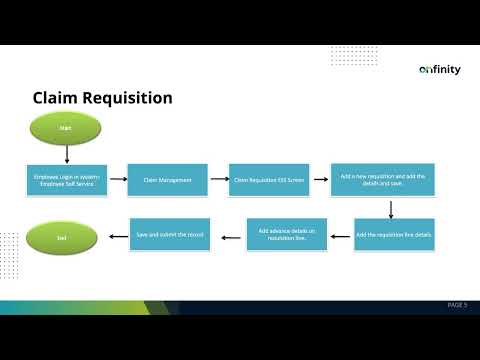
Onfinity ERP moves claim submission directly to employees through a dedicated portal. When an employee needs a travel advance, they access the claim management module without involving finance staff. The requisition form captures travel dates, destination details, and itemized advance needs in a single entry.
The travel advance requisition system structures requests through sub-requisitions. An employee breaks down a 15,000 rupee advance into separate categories: 7,000 for accommodation, 5,000 for airfare, and 3,000 for meals. Each category includes its own purpose, currency, and amount fields.
For each sub-requisition, employees mark whether an advance is needed and select the payment mode—bank transfer or cash. They attach supporting documents like booking confirmations directly to the requisition line. Once all details are entered, the submit button routes the request through configured approval workflows.
This structure eliminates the back-and-forth that happens when finance receives incomplete information. Employees provide all required data upfront because the form enforces mandatory fields like destination, currency, and travel dates. Finance teams receive structured requisitions ready for review rather than fragmented email requests.
Routing Approvals and Generating Payment Details Automatically
After submission, the system routes requisitions based on business rules tied to claim types and eligibility configurations. Approvers receive requests in their queue without manual forwarding. For standard travel advances, auto-approval capabilities reduce wait time when requests meet predefined criteria.
Once approved, the requisition automatically generates payment details visible on the finance dashboard. Finance staff see claims with payments already generated and those requiring action. The employee self service portal updates the submission status in real time, so employees know their advance is approved without sending follow-up emails.
The finance screen displays requisition-level summaries and advanced requisition charts showing how many requests include advance payments. This visibility helps finance teams prioritize processing during high-travel periods without digging through email inboxes or shared drives.
Processing Payments from a Centralized Finance Screen
Finance teams access approved requisitions through a dedicated claim requisition finance screen. Instead of toggling between email, spreadsheets, and banking systems, all requisition details appear in one view. Each requisition line shows the advance amount, currency, and payment mode selected by the employee.
The payment details tab displays bank information fields where finance specifies the payment method—check, direct debit, or online transfer. They select the document type and the bank account from which funds will be disbursed. If the payment method is check, additional fields for check number and check date become required.
After entering bank details, finance clicks the generate cash payment button. The system creates a payment transaction with a reference number that links directly to the original requisition. This reference number appears in the payment field, maintaining an audit trail from requisition submission through disbursement.
Payment records include organization name, document type, bank account used, transaction date, employee name, and payment method. Finance teams can zoom into payment lines to view full details without switching screens. The generate cash payment button disables after processing, preventing duplicate payments for the same requisition.
Operational Benefits of Connecting Requisitions to Payments
Employees submit detailed advance requests without waiting for finance team availability. They access the portal during business trips planning, enter requisition details, and attach supporting documents in one session. This self-service approach removes dependency on finance staff for initial data capture.
Finance teams process payments from a single screen instead of reconciling data across email threads and spreadsheets. The requisition-to-payment workflow eliminates duplicate data entry because all information entered by the employee flows directly into finance processing fields. Payment reference numbers tie back to requisitions, making reconciliation straightforward when employees submit actual expense claims after travel.
Visibility into advance amounts before trip completion supports better expense tracking. Finance knows exactly how much was advanced per category—accommodation, airfare, meals—making it easier to compare against final expense submissions. The centralized claim dashboard provides reporting data for analyzing travel spend patterns and supporting budget planning discussions.
Approval routing removes manual coordination between departments. Requisitions move through workflows based on rules configured once during setup rather than through email chains that depend on individual availability. Auto-approval for standard requests reduces processing time while maintaining control through documented business rules.
See the Claim Requisition Workflow in Action
If your finance team still processes travel advances through disconnected emails and spreadsheets, Onfinity ERP brings employees and finance onto the same platform. Request a demo to walk through the claim requisition workflow from employee submission through payment generation.
Follow us on LinkedIn for more insights on connecting employee operations with finance processes.