
Why ERP Screen Customization Matters for Finance and Operations Teams
Finance directors and operations managers encounter a recurring frustration: their ERP system stores the right data, but the interface doesn’t match how their team actually works. Invoice screens include fields that no one uses. Approval workflows need additional data points that don’t exist. Custom data collection for quality audits or customer feedback requires forms the system doesn’t provide.
Traditional ERP platforms require developer involvement to add fields, modify layouts, or create new screens. Each request enters an IT queue, incurring costs and delays. Finance teams wait weeks to adjust an AR invoice screen. Operations managers can’t deploy a simple feedback form without a change request. Low code ERP customization addresses this dependency by giving business users direct control over screen configuration while maintaining system integrity.
This shift reduces bottlenecks, lowers customization costs, and allows teams to adapt their ERP interface as processes evolve. When a finance director can modify an invoice screen or an operations lead can build a tracking form, the ERP becomes more aligned with actual workflows rather than forcing workflows to conform to rigid screens.
How Onfinity ERP’s Screen Composer Works
Onfinity ERP includes a visual interface for screen configuration that removes the need for coding. The Screen Composer presents predefined components such as text boxes, dropdowns, date fields, and tables. Users build or modify screens by dragging these components onto a canvas and configuring their behavior through a properties panel.
Existing screens, such as AR invoices, can be opened and adjusted in real time. Fields can be added, removed, or repositioned. If a finance team no longer needs a specific field on their invoice screen, they remove it. If they need to capture a new approval date, they add a date field and define its properties.
The configuration panel controls field behavior: whether a field is mandatory, visible, or read-only. Conditional logic can be applied to change field appearance based on specific conditions. Styling adjustments, including CSS-based formatting and icon assignments, personalize the interface without technical intervention.
When creating entirely new screens, the system generates the underlying database structure automatically. Users define the screen name, assign a module, and specify a table. The platform creates default columns and allows additional fields to be added as needed. This approach removes the database design burden while ensuring screen configurations integrate properly with the broader ERP environment.
Building Custom Forms: The Customer Feedback Example
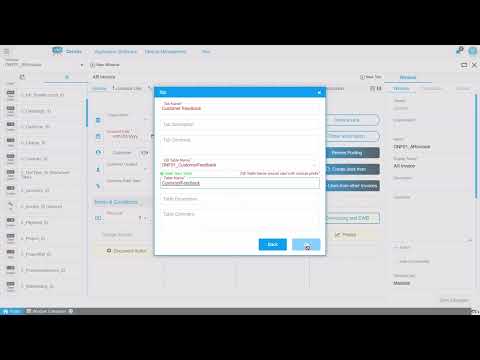
Creating a customer feedback screen demonstrates how non-developers can build functional application forms. The process begins by defining a new screen, assigning it a module prefix, and entering a display name and description. The system then creates a table with predefined columns.
From there, fields are added by dragging components onto the screen. A text field captures customer names. A date field records when feedback was submitted. A larger text area collects the feedback itself. Each field is linked to a database column, either by selecting an existing system element or creating a new one.
To ensure data quality, fields can be marked as mandatory. The feedback text area, for example, is configured to require input before the form can be saved. Layout adjustments happen visually: unnecessary fields are removed, checkboxes are repositioned, and the feedback area is expanded across multiple columns for better usability.
Icons can be assigned to fields for visual clarity, and CSS styling applies formatting such as color changes. Once the screen design is complete, a menu entry is created, access levels are set, and role-based permissions are assigned. The new form integrates directly into the ERP menu, allowing users to input and save data immediately.
Practical Benefits: From Screen Design to Production
The ability to modify screens without IT involvement changes how finance and operations teams respond to evolving requirements. When an AR invoice screen needs an additional approval field or a regional tax identifier, the finance team makes the change directly. There’s no waiting for a developer to interpret the request and schedule the work.
Operations teams deploy custom data collection screens for scenarios the ERP didn’t originally anticipate: quality control checklists, customer feedback forms, inventory audit screens. These forms integrate with existing ERP data, ensuring consistency and eliminating the need for external spreadsheets or disconnected tools.
A drag and drop screen builder saves time during both initial implementation and ongoing use. Changes save in real time and can be tested immediately. If a layout adjustment doesn’t work as expected, it can be revised on the spot. This immediacy accelerates deployment timelines and reduces the cost of customization.
Role-based permissions ensure that while business users control screen design, access to sensitive data and critical functions remains governed by the same security framework that protects the rest of the ERP. Finance managers can modify invoice screens, but only authorized roles can publish changes or assign access to new forms.
When Low-Code Screen Customization Fits Your ERP Strategy
Organizations with frequent screen modification requests benefit most from this approach. If your finance team regularly adjusts invoice layouts to accommodate new approval workflows or compliance requirements, the ability to make those changes internally reduces friction and cost.
Operations groups that need custom forms for audits, quality checks, or feedback collection gain flexibility without fragmenting their data. Instead of maintaining separate tools, they build forms within the ERP that connect directly to existing records and workflows.
Companies looking to reduce customization costs find value in shifting routine screen changes from IT to business users. Developer time is reserved for complex integrations and logic, while layout adjustments and new form creation happen at the business level.
Businesses seeking a unified platform where screen design integrates with core ERP functions avoid the complexity of bolting external form builders onto their system. When ERP application development tools are built into the platform, screen configurations, data models, and workflows remain consistent.
This approach fits mid to large enterprises where process variation across departments or regions creates ongoing demand for screen customization. It also suits organizations that value agility and want their ERP to adapt as business requirements shift, without requiring external consultants for every modification.
Watch how this works in Onfinity ERP:
See the Screen Composer in Action
If your finance or operations teams are waiting on IT to modify ERP screens or build custom forms, see how Onfinity ERP’s Screen Composer enables business-led configuration. Request a demo to explore the interface, or review the full walkthrough to understand how screen customization integrates with your existing workflows.
Follow us on LinkedIn for more insights on adaptable ERP workflows and practical approaches to platform configuration.