
Why Attendance Data Needs to Flow Directly Into Payroll
When attendance tracking and payroll processing operate in separate systems, HR teams spend hours reconciling punch records with salary calculations. Each pay period requires manual verification of worked hours, overtime entries, and leave deductions. This disconnected workflow creates bottlenecks that delay payroll runs and increase the risk of calculation errors.
An attendance management system that connects directly to payroll removes this manual layer. Punch data from biometric devices, mobile apps, and manual uploads flows into a unified log. Shift variations, overtime hours, and leave records get validated once and transfer directly to salary calculations. Payroll cycles run faster because attendance data arrives pre-verified and ready for batch processing.
Audit trails also improve when both functions share the same platform. Every punch, approval, and adjustment gets recorded in one place. Compliance reporting becomes simpler when attendance records and payroll outputs reference the same employee data and timestamps.
How Real-Time Attendance Capture Works Across Multiple Sources
Employees don’t always punch in from the same location or device. Field teams check in from client sites. Remote workers log hours from home. On-site staff use biometric terminals. The system needs to accept attendance data from all these sources and consolidate it into a single view.
Mobile punch-in allows employees to log attendance directly from their phones. The app displays assigned shifts and rosters so workers know their scheduled hours before they clock in. After punching in, employees can review their daily records and monthly summaries within the app. This transparency reduces disputes about worked hours and gives employees visibility into their attendance status.
Biometric attendance integration syncs real-time data from physical devices installed at office locations. Each punch gets timestamped and linked to the employee’s profile. When someone scans their fingerprint or card, the system records the exact time and updates the attendance log immediately.
Manual upload handles edge cases where neither mobile nor biometric options work. HR can import attendance records through text files when employees work offline or use temporary devices. All three sources feed into the same attendance log, so HR doesn’t have to check multiple systems to see who’s present or absent.
The dashboard provides instant alerts for missed punches, late arrivals, and early departures. Instead of discovering discrepancies at the end of the month, HR can address them as they happen. This real-time visibility prevents incomplete records from reaching payroll processing.
Managing Shifts, Overtime, and Attendance Exceptions
Shift patterns vary across teams and roles. Some employees work fixed schedules. Others rotate between day and night shifts. The system needs to assign shifts flexibly and track variations without manual intervention.
Shift management allows HR to assign daily, weekly, or monthly patterns to individual employees or groups. After selecting an organization and employee, HR chooses a shift slot and sets the recurrence—alternate days, full weeks, alternate weeks, or every day. Once published, the shift appears in the employee’s mobile app so they know when they’re scheduled to work.
Overtime tracking separates extra hours from regular shift time. When employees work beyond their scheduled hours, the system highlights those periods for approval. Overtime hours appear in reports with visual indicators, making it easy to review and authorize before payroll processing begins.
Attendance exceptions require manual corrections. If an employee forgets to punch out or records a single punch instead of a pair, the admin attendance log allows HR to add or adjust entries. This correction layer ensures that incomplete data gets resolved before moving to the summary stage.
The unsettled punches report identifies records with odd numbers of punches—single check-ins without check-outs, or mismatched entries. HR reviews this report to find and fix discrepancies before generating the monthly summary. Addressing these gaps early prevents errors from flowing into payroll calculations.
Generating Attendance Summaries and Transferring to Payroll
After capturing and validating attendance data, the system consolidates it into a monthly summary. This step transforms individual punch records into structured data ready for salary calculation.
The attendance summary screen pulls data from all sources—mobile app punches, biometric logs, and manually uploaded files. HR selects a timesheet and time period, then generates the summary. The system updates attendance records with employee status: present, absent, on leave, week off, or holiday. A daily log tab shows each employee’s punch history for the selected period.
Time card generation transfers validated attendance records with approval status. If an employee submits their time card through employee self-service with workflow approval, the status appears as approved, in progress, or rejected. HR can also create time cards directly from the attendance summary. This flexibility accommodates both self-service and centralized processing workflows.
Attendance batch creation packages finalized data for payroll attendance automation. HR selects the timesheet, time period, batch name, organization, and batch type. The system generates the batch and sends it to the prepayroll activity section. When payroll processing starts, HR validates the batch and transfers it to payroll calculation. This batch-based approach ensures that only complete, approved records enter salary computation.
The attendance master report provides a monthly audit trail with day-by-day employee records. Color-coded indicators make it easy to distinguish between attendance types—worked days, leave, holidays, and absences. This report serves as the comprehensive record for audits and compliance reviews.
Using Attendance Reports to Monitor Compliance and Patterns
Reports turn raw attendance data into insights that support operational decisions. Instead of manually analyzing punch logs, HR can review pre-built reports that highlight patterns and exceptions.
The late-in and early-out report tracks punctuality by comparing actual punch times to scheduled shift timings. When employees arrive late or leave early, the report highlights those instances in red. This visibility helps identify chronic punctuality issues and supports conversations about schedule adherence.
The overtime hours report breaks down extra hours worked beyond scheduled shifts. Overtime periods appear highlighted in blue, making it easy to see which employees logged additional time. This report supports overtime approval workflows and helps finance teams anticipate payroll costs before the cycle closes.
The attendance master report delivers comprehensive monthly summaries for audits. Each employee’s record shows daily attendance with color-coded identifiers. HR can view the entire month at a glance and drill down into specific days when needed. This format simplifies compliance reporting when labor authorities or auditors request attendance documentation.
These reports also reveal attendance trends over time. Repeated late arrivals might indicate scheduling conflicts. High overtime in specific departments could signal staffing gaps. By reviewing patterns, HR and operations teams can adjust policies and resource allocation before problems escalate.
Why Attendance and Payroll Work Better in a Unified Platform
Keeping attendance and payroll in separate systems creates data transfer risks. Every export, import, or manual entry introduces the possibility of mismatched records or lost updates. A unified platform eliminates these handoffs by storing all employee data in one place.
When shifts, leave, and salary calculations reference the same employee records, there’s no need to reconcile discrepancies between systems. Changes made in attendance management automatically reflect in payroll processing because both functions access shared data. This synchronization reduces errors and speeds up month-end closing.
Workflow approvals for time cards flow directly into payroll without external handoffs. If an employee’s time card requires manager approval, that status updates in real time. Payroll processing waits until approval completes, preventing unapproved records from entering salary calculations. This built-in control improves accuracy without requiring manual checks.
Real-time visibility across HR, operations, and finance improves coordination. When attendance data updates immediately, all departments see the same information. Finance can forecast payroll costs based on current attendance. Operations can adjust staffing based on actual hours worked. HR can address exceptions before they affect payroll deadlines.
Unified audit trails simplify compliance reporting. When attendance and payroll live in the same platform, every action gets logged in one system. Auditors can trace a payroll entry back to the original punch record without switching between applications. This transparency reduces audit preparation time and strengthens compliance documentation.
See the Attendance-to-Payroll Workflow in Action
If your team still reconciles attendance data manually before payroll runs, it’s worth exploring how integrated systems streamline this into a single workflow. From punch capture through batch generation, connected platforms reduce handoffs and improve accuracy. Request a demo to see how attendance, leave, and payroll work together in Onfinity ERP.
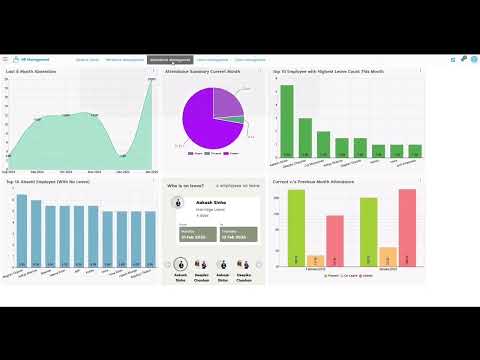
Watch the full walkthrough to see shift assignment, attendance validation, and biometric attendance integrated with payroll processing in Onfinity.