Onfinity 7
One system, and an agent that runs it
ERP, CRM, document management and business intelligence on a single data model, with an application dictionary that describes every part of it. That description is what lets AURA operate the software rather than talk about it.
Book a demo What changed in 7The release
Six things that changed in Onfinity 7
The through-line is AURA. In 6 it explained the system. In 7 it operates it, configures it, and had a hand in building the interface you are looking at.
An interface built on actionable widgets
The dashboard is where work starts now rather than where it gets reported. Each widget carries the figure, the exception and the action on one tile: convert the breakdown, review the duplicate, chase the oldest receipt.
Built largely with AURA, on the same dictionary it readsAURA writes to the ledger
The assistant that answered questions now carries out the work. It posts the supplier invoice, routes the approval and files the document against the order, on the live records.
A person confirms before anything is writtenAURA does the implementation work
It reads how a company already works and sets the dictionary to match: document types, numbering, approval routing, fields, validation, print formats. The work a business analyst and a functional consultant do in the first months of a project.
Standard product throughout — no fork, no custom codeAI orchestration
Agents that run unattended, on a schedule or a trigger, through the night and the weekend. Not a chat window somebody has to be sitting in front of for anything to happen.
Every run leaves a record of what it changedA mobile app you can talk to
Voice interaction with AURA on the phone, so the approval, the stock question or the status of an order happens away from a desk and without a keyboard.
CRM with over 2,000 integrations
The pipeline, the mailbox, the calendar and the rest of the stack connected to the customer record without a bespoke build for each one.
From the shipping build
The new interface, and the agent using it
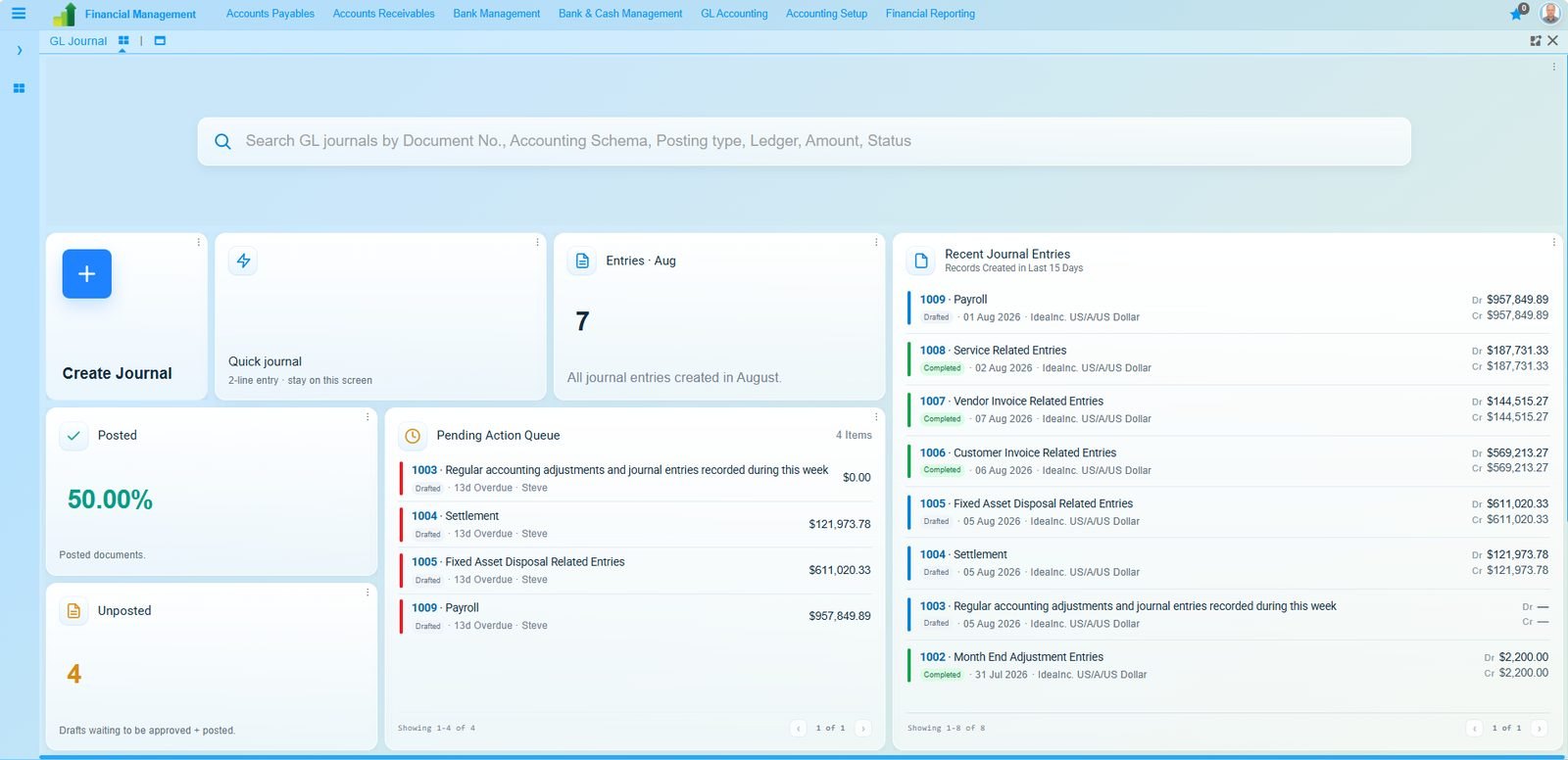
The interface
Act on the number without leaving the tile
Posted against unposted, a queue of what is waiting and who owns it, and the entries behind the figure. All on the screen you land on.
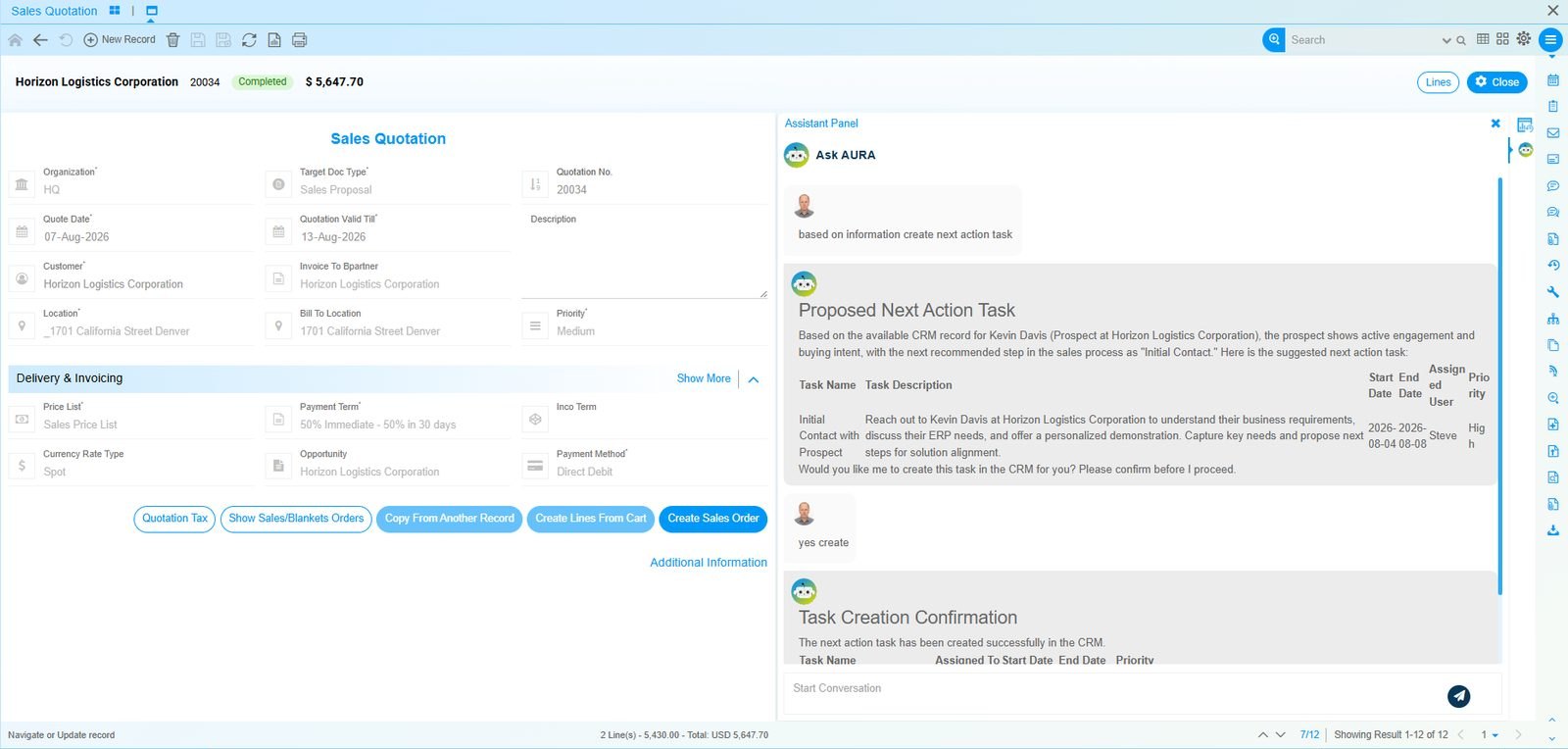
The agent
It proposes, you confirm, it writes
AURA reads the quotation and the linked prospect, drafts the follow-up with an owner, dates and a priority, and asks before it proceeds. The line at the foot is the task, created.
The difference in one line
In 6, AURA answered. In 7, it acts.
It told you what to do
- Answered questions about data and transactions
- Explained how a process worked
- Read documents and summarised them
- Left the record for a person to create
It does it
- Creates the record and shows what it wrote
- Routes approvals to the person who signs
- Files documents against the order they belong to
- Configures the system to match how you work
Nothing is written without a person saying yes. That sentence is the difference between a demo and something a finance director will allow near the ledger.
Two ways to run it
Both give you full control
The free edition runs a real business. The paid one adds the deeper modules, AURA, and someone accountable when it breaks.
Compare the editions ›See it create a record
Thirty minutes on your own data model, with the questions you would ask in an evaluation.
Book a demo Download the free edition