Sales Order

VIENNA Advantage Sales Orders enhances customer service through fast, efficient order processing and accurate, timely order fulfilment while maximizing sales through instant access to information on stock availability, prices and product substitutions.


Creating sales order

  • Various ways to create new sales order (standard creation from the order window, directly from customer contact lists, from blanket orders, etc.)
  • Have overview of all created sales orders
  • Choose target document type (standard order, POS order, on credit order, prepay order, release sale order, warehouse order, etc.)
  • Set order date and promised date
  • Choose existing customer from the list or add new customer (when choosing existing customer all customer fields will be automatically added in the order)
  • Set delivery and invoicing details (warehouse, representative, price list, currency)
  • Set order priority (urgent, high, medium, low, minor)
  • Set shipping rule (availability, force, complete line, manual, complete order, etc.)
  • Set invoicing rule (after delivery, immediate, customer schedule after delivery, etc.)
  • Set payment details (payment term, payment method, Inco terms, discounts, etc.)
  • Add references to campaign, project, opportunity, etc.
  • See order statuses (sub total, grand total, document status, etc.)

Creating order lines

  • Multiple ways to add products to order line:
    • manually add products by choosing them from a product search window
    • quickly add multiple product lines by selecting them from the product search window
    • select and add a pre-scanned set of products
    • add product cart of a customer (when customer buys the same items repeatedly, or has saved a favorite product cart)
  • Set order priority (urgent, high, medium, low, minor)
  • Set shipping rule (availability, force, complete line, manual, complete order, etc.)
  • Set invoicing rule (after delivery, immediate, customer schedule after delivery, etc.)
  • Set payment details (payment term, payment method, Inco terms, discounts, etc.)
  • Add references to campaign, project, opportunity, etc.
  • See order statuses (sub total, grand total, document status, etc.)

Blanket Sales Order

VIENNA Advantage Blanket Sales Orders provides an effective method of setting up contracts with your suppliers by providing blanket sales orders with multiple release dates, multiple call-offs and cumulative tracking.


Creating new blanket sales order

  • Set contract date
  • Set resource mobilization date
  • Set order valid from-to date
  • Choose existing customer from the list (all customer fields will be automatically added in the blanket order)
  • Choose warehouse from where the order will be prepared
  • Choose representative (person who has received the order)
  • Set blanket order priority (urgent, high, medium, low, minor)
  • Set shipping rule (availability, force, complete line, manual, complete order, etc.)
  • Set invoicing rule (after delivery, immediate, customer schedule after delivery, etc.)
  • Set price list
  • Set currency
  • Set payment details (payment term, payment method, Inco terms, discounts, etc.)
  • Add references to campaign, project, opportunity, etc.

Blanket sales order lines

  • Multiple ways to add products to order line:
    • manually add products by choosing them from a product search window
    • quickly add multiple product lines by selecting them from the product search window
    • select and add a pre-scanned set of products
    • add product cart of a customer (when customer buys the same items repeatedly, or has saved a favorite product cart)
    • have a real-time overview of product's quantity, ordered quantity and other available information in the product search window
  • Set product ordered quantity for each order line
  • Choose UOM
  • Set product/unit price
  • Set tax
  • Choose product price list and much more

Service Contracts

Service contract enables you to manage the services provided to your customers - from quoting the service and pricing to automatic renewal and invoice billing.
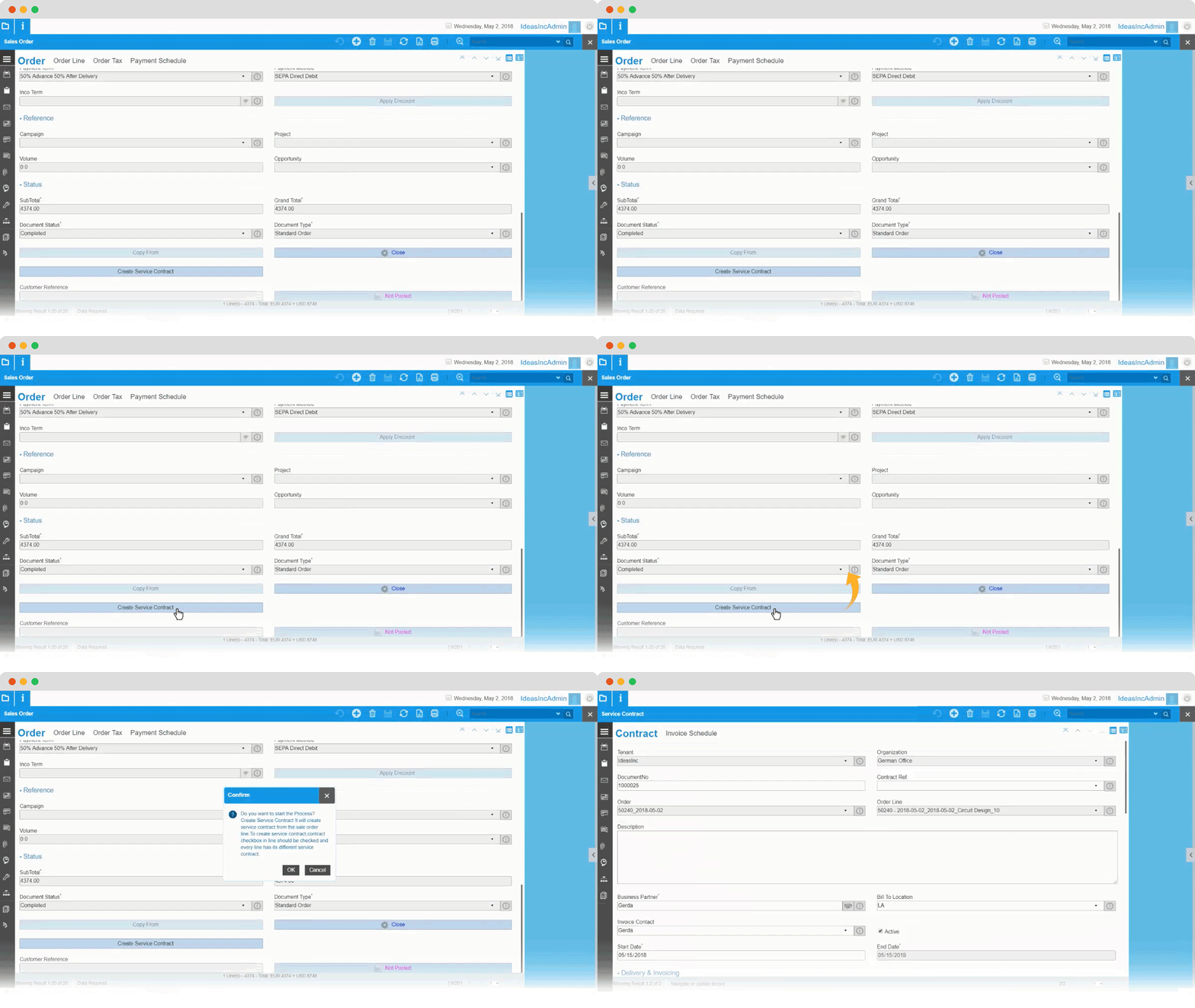

  • Automatically or manually convert sales orders into service contracts depending on the services added in the order line
  • Set contract start date
  • Set number of cycles
  • Contract end date is automatically calculated based on the number of cycles and the start date
  • Set billing frequency (weekly, monthly, annually, etc.)
  • Set bill start date
  • Set quantity per cycle
  • Set price list
  • Set payment term
  • Set currency
  • Set product details
  • Set contract references (to project, campaign, opportunity, etc.)
  • Set contract renewal type (manually or automatically based on triggers)
  • See contract status details such as total amount to date, grand total, tax amount, etc.


Invoice Schedule

Invoice schedule enable you to generate the invoice payment due dates schedule based on the payment terms define for customers. This is possible for customer service contracts, sales invoices and Expense invoices.
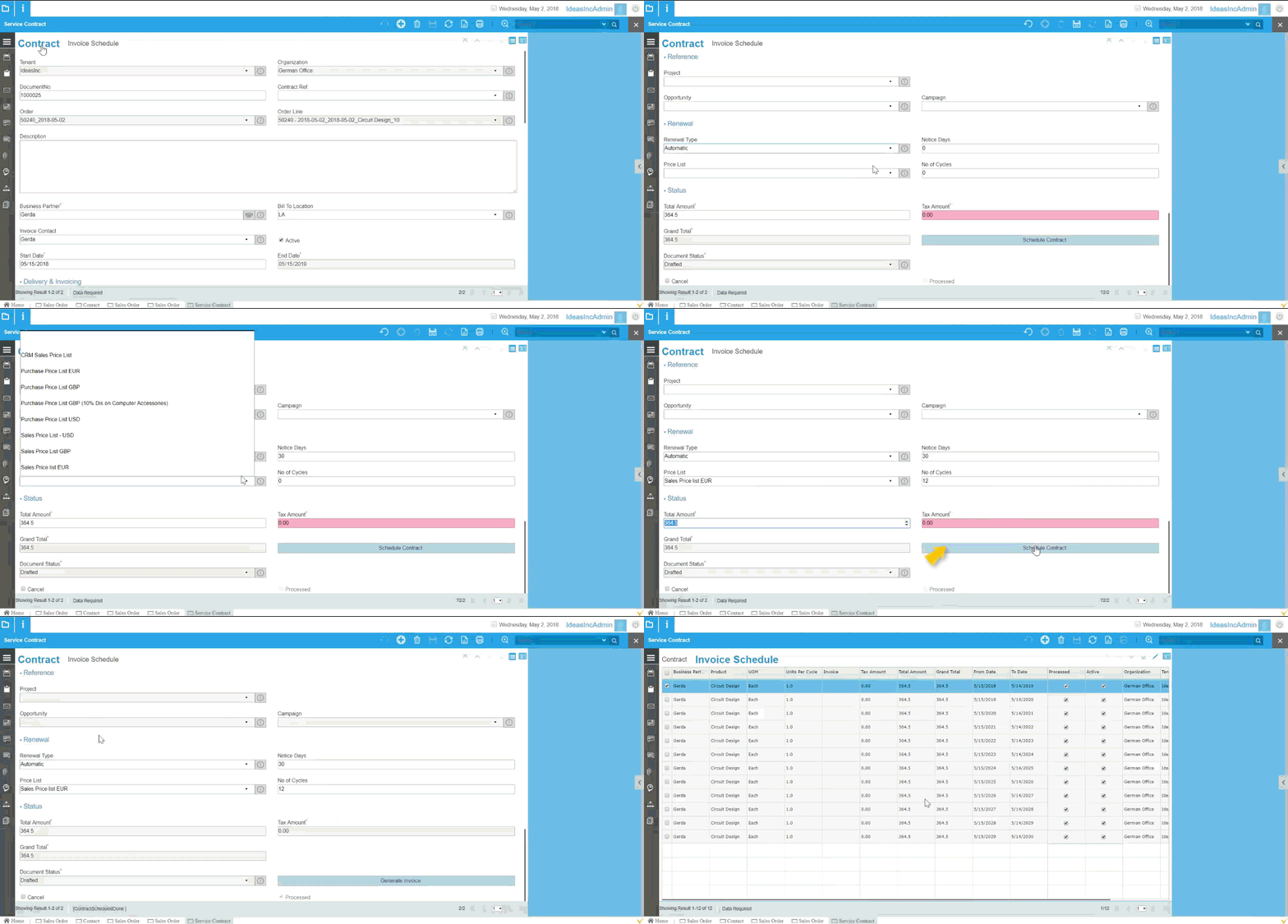

  • Connect contract to project, opportunity or campaign
  • Choose renewal type (automatically, manually) Set number of notice days
  • Set number of cycles
  • Choose a specific price list for the contract
  • See contract status details (total amount for the cycle, grand total, tax amount, document status, etc.)


Order fulfilment

VIENNA Advantage enables organizations to optimally manage their distribution operations with auto-generated shipments based on the shipping rules.
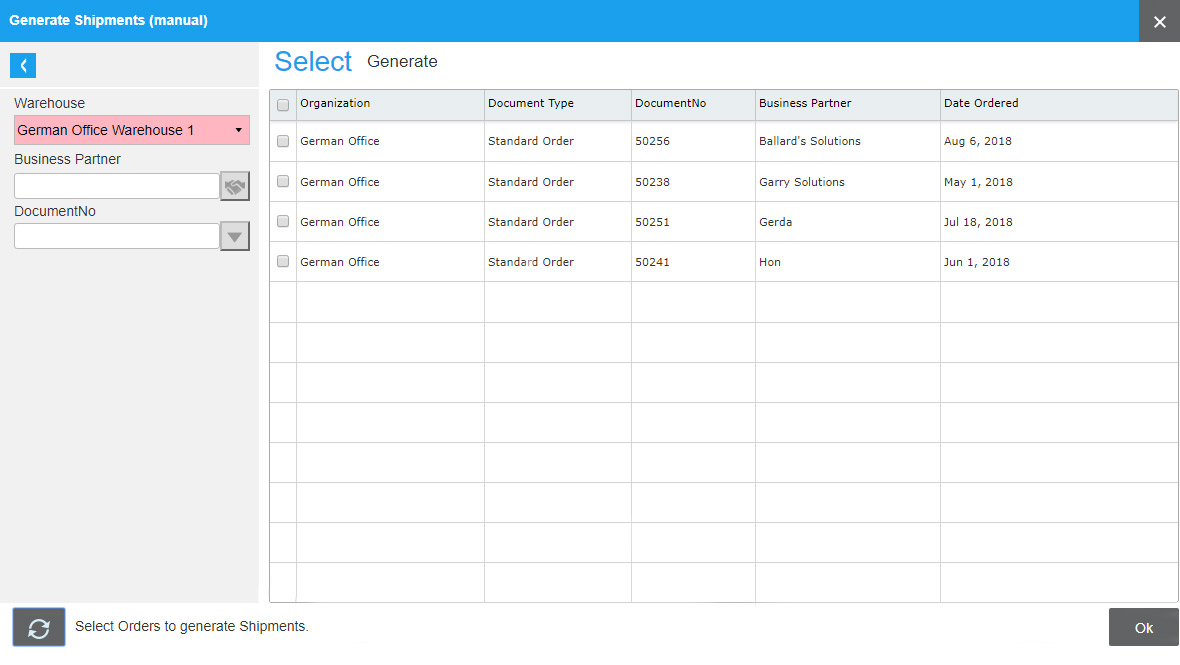

  • Connect contract to project, opportunity or campaign
  • Choose renewal type (automatically, manually) Set number of notice days
  • Set number of cycles
  • Choose a specific price list for the contract
  • See contract status details (total amount for the cycle, grand total, tax amount, document status, etc.)


Order Management Form

Order Management form enables to scheduling, tracking, fulfilling and being paid for orders. VIENNA Advantage advance Order Management functionality provides unrivaled visibility of complete sales process and helps automate many tasks to ensure that you are keeping your customers happy by hitting defined service levels, delivering on-time.
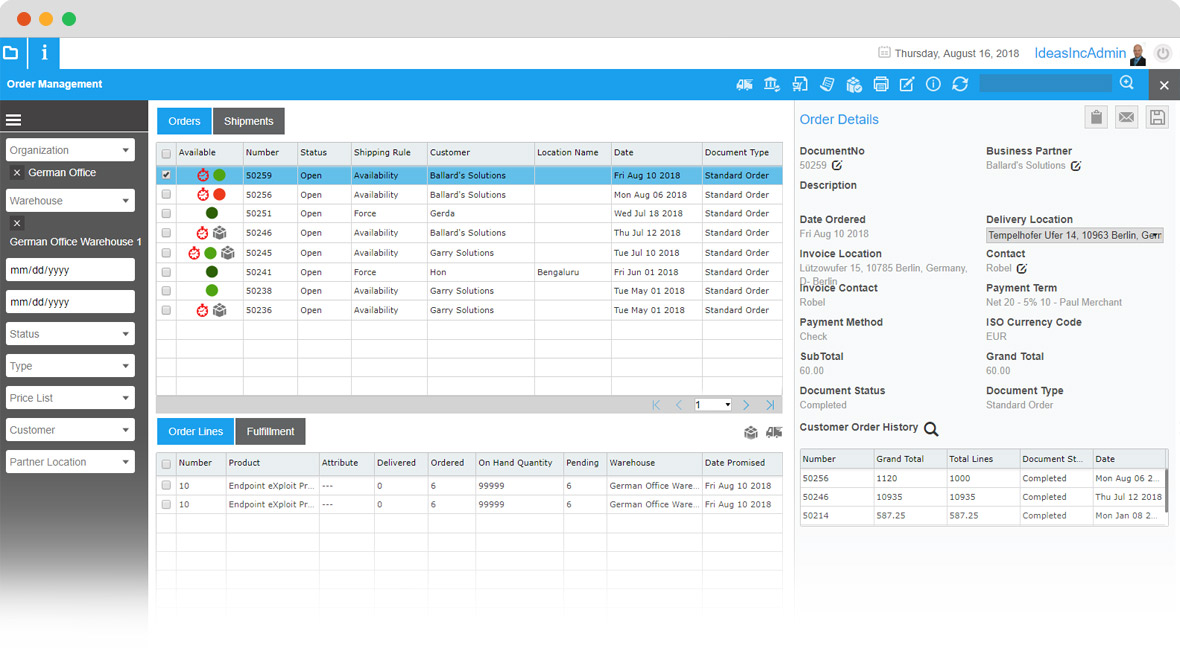

  • Have a complete overview of all orders and shipments' details into one single screen
  • See all orders in the pipeline for a specific organization and/or warehouse, and select one or multiple organizations/warehouses to display
  • Use different display filters such as: date range, order status, order type, price list, customer or partner location, etc.
  • Check specific details of each order such as order status, shipping rule, customer, location, order lines, fulfillments, etc.
  • Create shipments directly from the Order Management Form window and print documents
  • Once shipment is generated, you can enter tracking numbers, assign a shipper and complete the shipment
  • Reassign orders to another warehouse, when order can not be fulfilled from the assigned warehouse
  • See customer's order history
  • Create Purchase Order from a Sales Order
  • Generate replenishment if required (for example from another warehouse)


Stock Management Form

Stock Management form enable you to tracking inventory in multiple locations, set replenishment rules, generating Purchase order from replenishment, demand planning based on stock availability and distribution requirements planning.
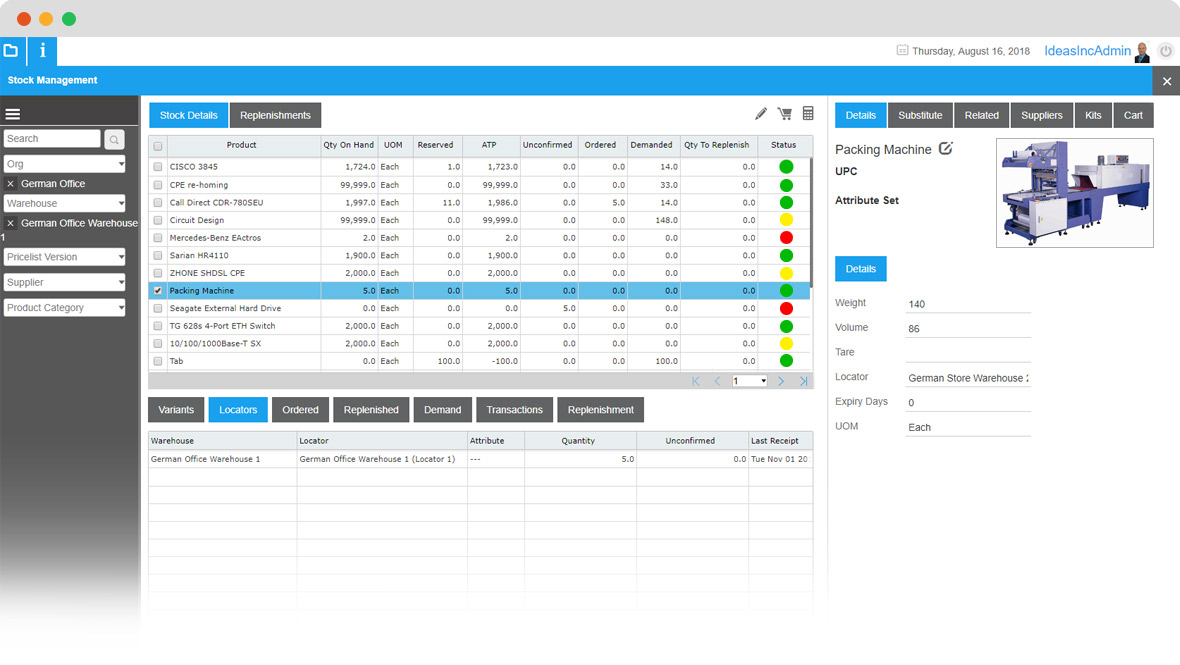

  • Have a complete overview of all stock and replenishment' details into one single screen
  • See product details about items you have on stock in a specific organization and/or warehouse, and select one or multiple organizations/warehouses to display
  • Use different display filters such as: price list version, suppliers, product category, etc.
  • Create new or edit existing customer carts directly from the Stock Management Form window
  • See a specific details of each SKU such as:
    • product variants
    • where in the warehouse this item is located
    • how much is ordered, replenished, demand
    • see list of transactions related to the selected item, etc.
    • see list of item replenishments
    • see product attributes (weight, volume, photo, UOM, expiry days, LOT, etc.)
    • see product substitutes
    • see related products
    • see all suppliers of the selected product
    • see product kits and much more


Order Management Reports

Order management reports display the consolidated and summarized data of sales. Data in the reports can be displayed in monthly, yearly, and quarterly views. Reports provides the information to do the analysis as per the dimensions selected.
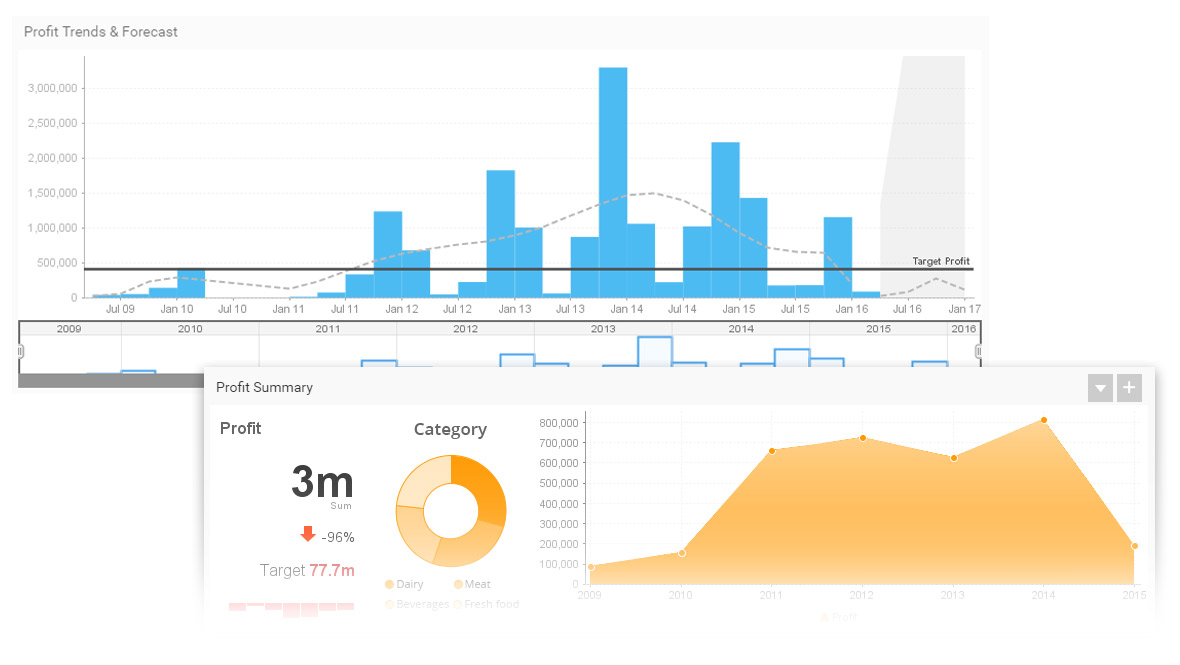

  • Product sales summary
  • Product sales margin
  • Sales order status report
  • Aged sales order report
  • Sales order profitability
  • Shipment detail report
  • Sales journal details report
  • Quote expiration report
  • Sales by product report (summary org.)
  • Open transaction report
  • Sales by product report (non summary org.)
  • Choose from hundreds of ready-made order management reports, or create your own custom report, based on your specific business needs


Commission Management

VIENNA Advantage provides integrated functionality for managing and tracking sales commissions, incentives and processing associated payments. Our commission management solution supports multiple commission methodologies. Commissions can be calculated at invoice level or order level


  • Allows comprehensive commission structures based on Orders, Receipt or Invoice.
  • Commissions can be calculated at multiple levels of sales activity.
  • Commission rules can be defined by business partner, products, organization, sales region or in combination.
  • • Commissions can be calculated weekly, monthly, quarterly or yearly.

Why wait any longer?

Grow your business with an integrated ERP and CRM solution. Register today and get 30 days FREE trial including support.


START NOW or Request free TCO analysis